
WordPress 7.0 Features The Biggest Update for Collaboration, Workflow, and Modern Site Management
WordPress 7.0: A Major Step Toward Collaborative Publishing
WordPress 7.0 is shaping up to be one of the most important releases in the platform’s history. Instead of focusing only on minor improvements, this update introduces new tools designed to make WordPress more collaborative, more flexible, and more modern for teams of all sizes.
For years, many WordPress users relied on third-party tools for feedback, approvals, and project coordination. WordPress 7.0 begins to reduce that dependency by bringing more of those workflow features directly into the core experience.
Collaboration Comes to the Block Editor
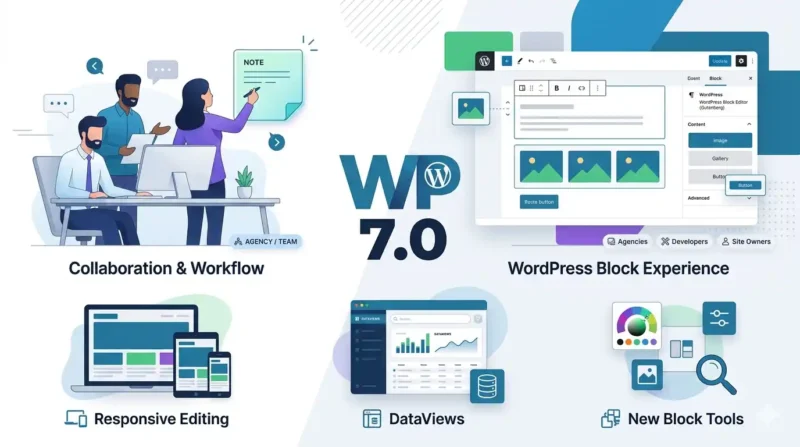
One of the biggest changes in WordPress 7.0 is the introduction of Notes. This feature allows users to leave feedback directly inside the block editor, tied to specific blocks or content areas.
That means no more screenshots, long email threads, or confusing Slack messages. Teams can now discuss edits where the content actually lives. For agencies, editors, and clients, this makes approvals and communication much easier.
Responsive Editing for Different Devices
WordPress 7.0 also introduces Responsive Editing Mode, which gives users more control over how blocks appear on desktop, tablet, and mobile devices.
This is a useful improvement for content teams that want to customize layouts without writing CSS or installing extra plugins. It helps simplify the process of adapting content for different screen sizes while keeping the editing experience straightforward.
Smarter Pattern and Template Editing
Patterns and template parts are becoming easier to manage in WordPress 7.0. New editing modes help users work with reusable content without losing context inside the editor.
This is especially helpful for websites that rely on synced patterns, global blocks, or shared design elements. It reduces confusion and makes updates more efficient.
New Design Controls for Blocks
WordPress 7.0 adds several native design tools that improve layout control without requiring custom code or page builder plugins.
These include:
- Text line indent
- Text column support
- Aspect ratio controls
- Dimension presets
These features give theme developers and site builders more flexibility while keeping the block editor clean and efficient.
A More Modern Admin Experience with DataViews
Another major update in WordPress 7.0 is the redesign of the admin interface using DataViews.
The Posts, Pages, and Media screens are being updated to feel more like a modern application than a traditional database table. Users will be able to filter, sort, and manage content more easily, with layout options that feel cleaner and more intuitive.
This is especially useful for larger sites and editorial teams that manage a lot of content.
Important PHP Requirement Changes
WordPress 7.0 raises the minimum supported PHP version to 7.4, with PHP 8.3+ recommended for the best experience.
If your site is still running on older PHP versions, now is the time to plan an upgrade and test everything in a staging environment. This will help reduce compatibility issues when the new version is released.
New AI and Developer Infrastructure
WordPress 7.0 is also building the foundation for future AI-powered workflows through the Abilities API and related infrastructure.
Rather than becoming an AI writer itself, WordPress is creating a way for plugins and AI tools to work together more securely and consistently. This opens the door for smarter automation, content assistance, and workflow integration in the future.
New Blocks and Block Improvements
WordPress 7.0 is expected to ship with new blocks such as:
- Breadcrumbs
- Icons
It also improves existing blocks like:
- Gallery
- Grid
- Cover
These updates make the block editor more powerful out of the box and reduce the need for extra plugins.
Why WordPress 7.0 Matters
WordPress 7.0 is more than just another version update. It represents a shift toward collaboration, better workflows, and a more modern publishing experience.
For developers, it introduces new opportunities and some important compatibility considerations. For agencies and site owners, it offers a better way to work together and manage content more efficiently.
If you use WordPress regularly, this is a release worth preparing for early.
FAQ
What is the main focus of WordPress 7.0?
The main focus of WordPress 7.0 is collaboration and workflow. It introduces tools like Notes, responsive editing, and better pattern management to support team-based publishing.
When is WordPress 7.0 expected to launch?
WordPress 7.0 is targeted for release on April 9, 2026.
What is the minimum PHP version for WordPress 7.0?
The minimum supported PHP version is expected to be 7.4, with PHP 8.3 or higher recommended.
Will WordPress 7.0 include a new default theme?
No, WordPress 7.0 will not ship with a new default theme. The focus is on improving block themes and the Site Editor experience.
What is DataViews in WordPress 7.0?
DataViews is the redesigned admin interface for managing content. It makes the Posts, Pages, and Media screens feel more modern and easier to use.
Is WordPress 7.0 good for agencies and developers?
Yes. WordPress 7.0 includes collaboration tools, workflow improvements, and developer-focused infrastructure that should be especially useful for agencies and plugin/theme developers.


















Post Tags
Follow tags & authors — get email updates when they publish
Add your first comment to this post